
The Token Discipline Stack: A 2-Week Field Report from Agentic Coding
Two weeks of Claude Code on a fresh account, 5.4M tokens, no bill-shock drama. I burned millions on a previous account before I understood how agentic coding costs work. Here is the system I rebuilt with — what earned its place, what didn't, and what I'd skip if starting over.
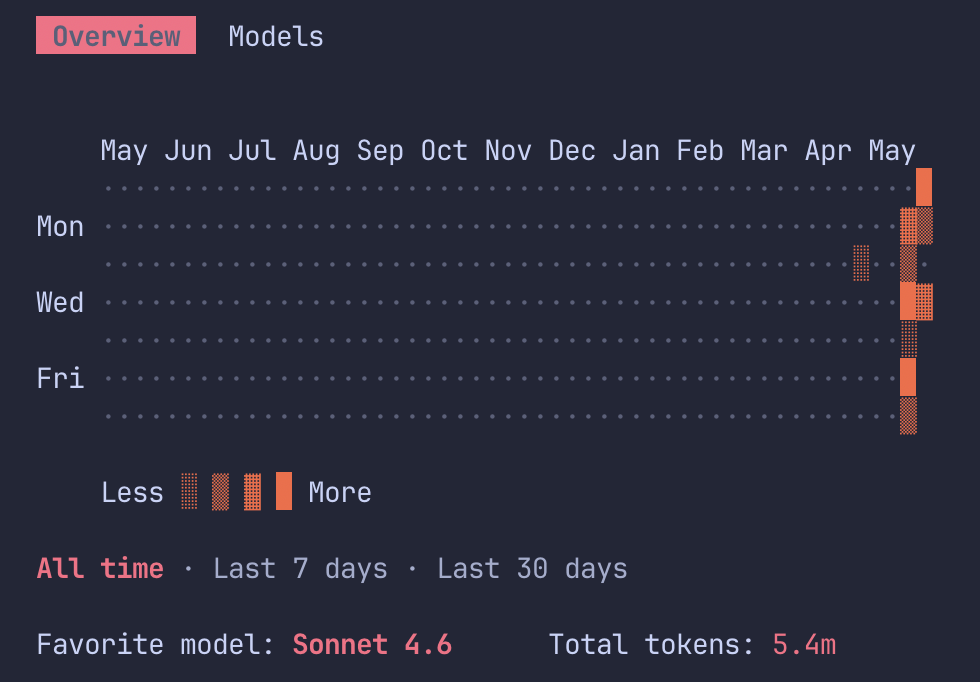
This is two weeks of Claude Code on a fresh account. 5.4 million tokens. Sonnet 4.6. No bill-shock thread on Reddit, no $1,600 horror story, no session that died at 30 minutes.
I'm not new to agentic coding. I burned through tens of millions of tokens on a previous account before I understood how the cost structure actually works — installing every popular plugin within a week, leaving sessions running for hours, letting the agent read entire directories on a whim. By the time I started measuring properly, the receipts were already in.
This new account is the rebuild. Same workflows, different defaults. The screenshot above isn't impressive on its own — plenty of people burn through 5M tokens before lunch. What's interesting is the deliberate part: I knew where the leaks were before I opened the first session, and I built around them from day one.
This post is what I'd do differently the second time. Including which of the viral "token-saving tools" actually earn their place in 2026, which are mostly theater, and what I'd skip entirely if I were starting today.
Why agentic coding burns tokens differently from chat
If you've used ChatGPT in a browser, your mental model of LLM costs is probably wrong for agentic coding. Chat is mostly cheap because conversations are short and stateless-feeling. Agentic coding looks the same on the surface but behaves nothing like it under the hood.
Three mechanics matter:
Every turn re-sends the full context. The model has no memory. Turn 40 in a session pays for everything from turns 1 through 39 — the system prompt, every file the agent has read, every command output, every error message, the entire transcript. Input tokens compound across turns even when you think you're "just asking one more question."
Tool outputs accumulate permanently. A single gh issue list returns ~59KB of JSON. That's about 15,000 input tokens. If you run it at turn 5 and your session goes 50 turns, you've paid for those 15,000 tokens 45 times. Now multiply that by every git diff, every cargo test, every file the agent reads. The math gets ugly fast.
Output tokens cost 2-5x input tokens. And agents narrate themselves a lot — explaining their plan, recapping what they just did, restating the problem after compaction. That narration is paid for at an expensive rate.
The result: per-token pricing tables badly underestimate what an agentic session actually costs. The headline number is the one for a single API call. The real number is that call multiplied by the accumulation curve.
If you understand only this section, you've already got more leverage than most people writing about Claude Code costs.
The defaults I set deliberately this time
Before I installed any tools, I set up the new account with the things I wish I'd done on the old one. These are unglamorous, but they probably saved me more tokens than any of the popular plugins:
Sonnet 4.6 as the default, not Opus. Sonnet costs $15 per million output tokens versus Opus 4.7's $25, and for the agentic work I actually do — refactors, test fixes, MCP server glue code, infrastructure scripts — Sonnet is the right tool. I save Opus for genuinely hard reasoning tasks, which turn out to be maybe 10% of sessions. The cost gap is real, and it compounds across hundreds of sessions.
One task per session. The single highest-leverage habit. Long marathon sessions accumulate context geometrically; short focused sessions reset the meter. If I find myself starting a new task mid-session, I close and reopen.
A small CLAUDE.md, not a big one. CLAUDE.md loads on every session start. A 1,000-token project memory file costs you 1,000 tokens every single time you open the project. Over 100 sessions, that's 100K tokens of overhead — for context, you already wrote. Mine is under 300 tokens and points to specific skill files only when needed.
.claudeignore configured before the first prompt. Out of the box, agents will happily read your node_modules, your .next/cache, your committed lockfiles, and your build artifacts. The .claudeignore is the difference between an agent that scans your source and one that scans your source plus 200MB of generated noise.
/cost as a reflex, not an emergency check. I run it at the start of every session and again before any task that involves reading more than a couple of files. It's the equivalent of looking at the dashboard before driving rather than after the engine catches fire.
None of this is fancy. None of it requires installing anything. And taken together, it does more work than half the plugin stacks I see on Reddit.
Hooks: automate the discipline so you don't have to remember it
Defaults only work if you remember them. Hooks are how you stop relying on memory.
Claude Code exposes lifecycle hooks (SessionStart, PreToolUse, PostToolUse, UserPromptSubmit, PreCompact, Stop, SessionEnd) that let you run arbitrary shell commands at specific moments. They're underused because most early guides skipped them, but they're the difference between a workflow that's disciplined in theory and one that's disciplined in practice. Here are the high-leverage ones for token discipline:
SessionStart — run /cost and inject the meter. The simplest, highest-value hook. Fires at session open, prints your current cost state into the session before you type anything. You see the meter and the previous session's spend instead of having to remember to ask. Mine also echoes a one-line reminder of the active project budget.
Stop / SessionEnd — log final cost to a baseline file. When the session ends, append the final /cost numbers, duration, and a one-line task description to a local CSV or JSON file. After a week of this you have your own per-task cost baseline, which is more useful than any blog post's percentage claims. After a month, you'll know exactly which kinds of work cost what.
PostToolUse — sample /cost after expensive operations. Wire this to fire after file reads above a size threshold, MCP responses, and web fetches. Don't run it on every tool call (the noise outweighs the signal) — only after the operations that actually move the meter. The first time you see a single MCP call jump your input cost by 30%, you'll understand why this hook exists.
PreToolUse — gate or rewrite expensive commands. This is the hook RTK uses to transparently rewrite git, cargo, and docker commands to their compressed equivalents. You can do the same yourself for project-specific noise: rewrite your team's verbose logging command to a quiet variant, or block expensive find/grep patterns that scan generated directories. Apply the same pattern to anything your agent reaches for that returns more than it needs to.
UserPromptSubmit — token-budget warnings. Set a threshold (mine is 60% of the context window) and have the hook inject a soft warning when you cross it. Not a hard stop, just a visible nudge that says "you're past the comfort line; consider closing and reopening for the next task." The friction is the point — it makes one-task-per-session enforce itself.
PreCompact — snapshot state before compaction wipes it. Compaction loses state, which is why I argue against manual /compact reflexes in the "What I'd skip" section. But sometimes compaction happens anyway. This hook captures the active task, open files, and recent decisions to a local snapshot file right before the wipe. Context-Mode handles this natively; if you're not running Context-Mode, doing it manually with a hook is a cheap insurance policy.
A few ideas that compound nicely once you have the basics:
A weekly digest cron. Not a hook strictly — a cron job that reads the log file your SessionEnd hook produces and emails or Slacks you the previous week's cost breakdown. Tokens per task type, most expensive sessions, average session length, drift from baseline. The dashboard you actually need.
Auto-load skills per project type. A SessionStart hook that detects whether you're in a Rust repo, a TypeScript project, or an infra directory, and loads only the relevant skill files into context. Skips loading the others. Same outcome as a big CLAUDE.md without the per-session token tax.
Statusline cost indicator. Pipe the running /cost into your Claude Code statusline so the number is always visible. You stop relying on memory or hooks to remind you; the number just sits there. Caveman ships one of these; you can write your own in about 20 lines.
Two pieces of hard-won advice on hooks: start with one, and keep them silent. The failure mode is installing five at once and creating so much hook output that your context fills with hook noise instead of work. SessionStart and SessionEnd are the two I'd add first — together they take about 10 minutes to write and they're the foundation everything else builds on.
The five token leaks (and what plugs each one)
Once your defaults are clean, the remaining waste is structural. There are five distinct leaks in an agentic coding session, and the popular tools exist because each one solves exactly one of them. Stacking them isn't additive — you can't multiply the percentages — but addressing different leaks with different tools is.
Here's the taxonomy, with my verdicts after two weeks of real use:
CLI noise — RTK (Rust Token Killer). cargo test, git status, docker ps dumping verbose output the agent doesn't need. Verdict: Installed. Real impact on test-heavy and git-heavy sessions. Mid-impact for me because I shell out less than power users.
Tool output bloat — Context-Mode. MCP responses, Playwright snapshots, log file reads, and filling context with raw data that the agent only needs a slice of. Verdict: The biggest single win on my stack. Sessions stay coherent past the point where they used to compact.
File-read overhead — Codebase Memory MCP, Claude Context. Reading whole files when the agent needs three functions from a 2,000-line module. Verdict: Haven't installed yet. On the list — high theoretical value for navigation-heavy work.
Tool definition tax — MCPlex, native tool search. 81+ MCP tools can consume ~143K tokens of context before your first message. Verdict: Skipped. I don't run enough MCP servers yet for this to matter. Will revisit at 20+.
Output verbosity — Caveman. The agent's polite prose, recaps, and explanations padding answers. Verdict: Tried for a week. Removed. Details below.
Honest numbers on the popular tools
Most viral token-savings posts inflate claims. The percentages get treated as if they apply to whole sessions, when usually they apply to a narrow slice of context. Three corrections worth knowing:
Caveman's 75% is real but tiny in practice. The skill makes the model respond in compressed, primitive-style language — and yes, the output prose really does shrink by 60-75%. But in a typical Claude Code session, prose responses are maybe 20-25% of the output token count. Tool calls and code blocks (the majority of output) aren't touched, because the skill explicitly preserves them. The honest session-level reduction is closer to 4-6%, not 75%. After a week of running it, the style cost (responses that read like a telegraph operator) wasn't worth that delta for me. Mileage will vary if you're doing high-volume automated pipelines where every percent counts.
Context-Mode's 98% is real, but on the ,tool output specifically. The plugin's headline number — 315KB compressed to 5KB — is the volume of tool output it keeps out of context, not your total token spend. If your sessions are tool-heavy (lots of file reads, log dumps, MCP responses), this is the most impactful tool you can install. If you mostly do conversational debugging, the gain is smaller. For my workflow, it's the keeper.
RTK's 60-90% is real, but on CLI output only. If you live in cargo test and git diff, RTK is excellent. If your sessions don't shell out much, the impact is modest. Worth installing regardless because the overhead is near zero and the discovery command (RTK gain) is genuinely informative even when it's reporting small numbers.
None of this means the tools are bad. It means the math people aren't doing is the math that matters. Stack them because they address different leaks, not because the percentages add up to anything.
The setup I'd recommend
Three tiers based on commitment. The middle one is what I actually run.
The 10-minute setup. No plugins, no installs. Default to Sonnet 4.6 and save Opus for hard reasoning. Add .claudeignore covering build artifacts, lockfiles, and generated directories. Keep CLAUDE.md under 500 tokens and point to skill files instead of inlining instructions. Add one line: "Be concise. No filler. No hedging." Run /cost at the start of every session. This alone gets most people 30-40% of the savings the full stack delivers.
The serious setup (this is what I run). The 10-minute setup plus Context-Mode for tool output sandboxing, RTK for CLI output compression, SessionStart and SessionEnd hooks for automatic /cost logging, and customized memory files with a small set of project-specific skills. This is the point where sessions get noticeably longer, and the /cost command stops triggering anxiety.
The maximalist setup (haven't tested fully). Above plus Codebase Memory MCP for navigation, MCPlex if you run 20+ MCP servers, PostToolUse and UserPromptSubmit hooks for fine-grained budget enforcement, and possibly Caveman if you're running automated pipelines where prose output volume matters. I'd add these incrementally and measure after each, because the failure mode of installing everything at once is that you can't tell what's actually helping.
What I'd skip
The counterintuitive section, and probably the most useful one if you've been reading other guides:
Switching models mid-session to "save tokens". I used to do this constantly on my old account. It doesn't work the way you think — the context still accumulates regardless of which model is processing it, and the cheaper model often produces longer or worse outputs that cost more to clean up. Pick the right model at the start of the session and stay with it.
Manual /compact reflexes. Compaction loses state. The agent has to rediscover the problem on the next turn, which costs output tokens and often introduces errors. Compact when the context is genuinely full, not as a token-saving habit.
Obsessive prompt shortening. Your prompts are probably 5% of your token spend. Cutting them in half saves 2.5%. The real waste is in tool outputs and accumulated context, not your typing.
Installing all the popular tools at once. I made this exact mistake on my old account. Five plugins installed in three days, no baseline measurements, no way to attribute savings to any specific tool. Install one at a time, measure for a week, then add the next.
Cheap-model routing as a first move. Routing simple queries to a cheaper model is genuinely useful for production systems serving real traffic. For a single developer in Claude Code, it adds complexity and saves less than the defaults section above. Get the defaults right first.
The decision tree
If I were starting Claude Code tomorrow with what I know now, here's the order:
Step 1: Defaults — Sonnet 4.6 by default, .claudeignore configured, CLAUDE.md under 500 tokens, /cost reflex.
Step 2: Pick by symptom — Sessions dying at 30 minutes? Install Context-Mode. Burning tokens on test/CLI output? Install RTK. Mostly navigating large codebases? Install Codebase Memory MCP. Running 20+ MCP servers? Install MCPlex. High-volume automated pipelines? Try Caveman.
Step 3: Measure before adding the next tool — One tool, one week, one /cost comparison.
Step 4: Automate it — SessionStart and SessionEnd hooks first, then PostToolUse for expensive operations. The goal is to stop relying on memory for any of this.
The takeaway
Token discipline in agentic coding isn't about finding the magic plugin. It's about understanding that every turn re-sends the full context, that tool outputs accumulate permanently, and that the popular tools each solve one specific leak rather than the whole problem.
The screenshot at the top of this post isn't a brag. It's the result of two weeks of deliberate defaults, plus two well-chosen plugins, plus the hooks that enforce both. The version of me that started on the old account would have hit 5.4M tokens in a few days, not two weeks, and would have nothing to show for the difference except a slightly bigger bill.
If you're new to Claude Code, get the defaults right before installing anything. If you've been using it for a while and feel like your bill keeps creeping up, audit the five leaks above and install one tool for the leak that's hurting you most. Then write the two hooks that make /cost automatic. And don't trust any percentage claim — including the ones in this post — until you've measured your own sessions.